
Easy Deposit Money Process
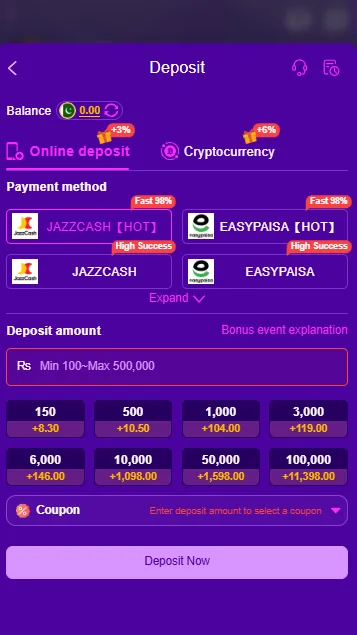
98pkr deposit process is designed to be simple for users who want to add funds to their gaming account. Depending on the current payment options available, users in Pakistan may be able to use local services such as JazzCash, EasyPaisa, or other supported methods.
Before making a deposit, check the payment options shown in your account because available methods, limits, fees, and processing times can change. Always enter your payment information carefully and use an account that belongs to you.
How to Make a 98pkr Deposit?
Adding money to your account usually takes only a few basic steps. Follow the instructions below and check your details before confirming the payment.
Common 98pkr Deposit Problems
| Deposit Problem | What You Can Do |
|---|---|
| Balance Not Updated | Wait for the processing period and refresh your account balance. |
| Payment Failed | Check your payment details, wallet balance, and internet connection. |
| Wrong Wallet Number | Contact the payment provider or official platform support if the transaction was already submitted. |
| Deposit Pending | Check the transaction status and allow the stated processing time. |
| Payment Method Missing | Check whether the method is currently supported for your account. |
Tips for a Safe 98pkr Deposit
Keeping your payment information secure is just as important as completing the transaction correctly.
General Asked Questions About Deposit
How can I deposit money on 98pkr?
Log in to your account, open the wallet or payment section, select Deposit, choose an available payment method, enter the amount, and follow the instructions to complete the transaction.
Can I use JazzCash for a 98pkr deposit?
JazzCash may be available as a deposit method when supported by the platform. Check your current deposit page to confirm availability before making a payment.
Can I deposit through EasyPaisa?
If EasyPaisa is listed among the payment methods in your account, you can use it by following the instructions provided on the deposit page.
Why has my deposit not appeared?
A payment may take time to process. Check your transaction status and account balance first. If the stated processing time has passed, contact official support and provide your transaction reference.
What should I do if I enter the wrong wallet number?
If you have not submitted the payment yet, correct the number before confirming. If the payment has already been sent, contact the relevant payment provider and official platform support as soon as possible.
Is there a minimum deposit amount?
The minimum deposit can change depending on the platform and payment method. Check the current deposit page for the amount that applies to your account.